 KeyBlogging
HTML Basics
HTML (HyperText Markup Language) – The language or code that makes computers able to communicate with each other. HTML determines what is displayed on a page.
HTML Tags – The basis of HTML (e.g. )
- HTML Tags are defined by a left angle bracket (<), the name of the tag or element (title), and right angle bracket (>).
- Tags contain the contents of an element with a beginning (
)and an end tag (/title). The end tag looks the same as the beginning tag, but with an extra slash between left angle bracket and the name of tag. Whitespace – The term describing characters that don’t display on a page (spaces, tabs, newlines). Whitespace will be treated as a single space in the display of a site and what is before and after the whitespace will wrap together.
Paragraphs (
) are used to display text. You can put text outside of a paragraph tag, but it is easier to format text within the paragraph element.It is best to style and format paragraphs using CSS (Cascading Style Sheets). We will not go into detail on CSS in this course, but you can use CSS to do things such as align a paragraph to the center. <p style=”text-align: center”>
Phrase & Font Elements
Phrase Elements – semantic tags used to format text of particular significance Font Markup Elements – tags used to change the visual style of a font • – defines important texts and displays bolded
• – renders as emphasized text and displays italicized
• – defines a definition term
•– defines a piece of computer code
• – defines sample output from a computer program
• – defines keyboard input – defines a variable• – boldface
• – italic
• – teletype
• – underline
•– strike through
• – big print
• – small print
• – subscript
• – superscriptSome phrase and font markup elements look the same (e.g. and ). Use the phrase elements when the text is more important than other text on the page. Use font markup elements when the desired effect is only visual/stylistic.
Line Breaks & Spaces
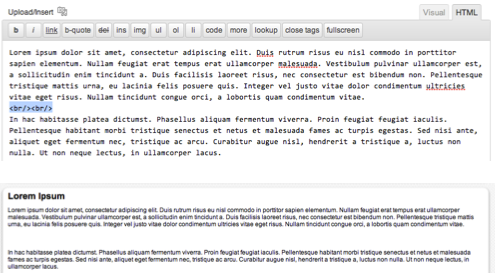
– line break- Since br is an empty tag and has no contents, you can use the empty tag short cut and put the slash inside the brackets.
- This is not a paragraph break. To make it look like paragraph, or bigger break, repeat the
tag.
– non-breaking space inserts extra spaces between words
Images
- Image Tag – <img src=”example.jpg” alt=”example of image” title= “example image” height=”150″ width=”150″>
- Attributes of the image tag
- src – specifies the source or URL of the image
- alt- alternative text of an image (describes the contents of the image and will display if the browse can’t load the image or loads slowly)
- title – text that will display in a tooltip
- height – height of image in pixels
- width – width of image in pixels
- tag defines the image caption
Hyperlinks
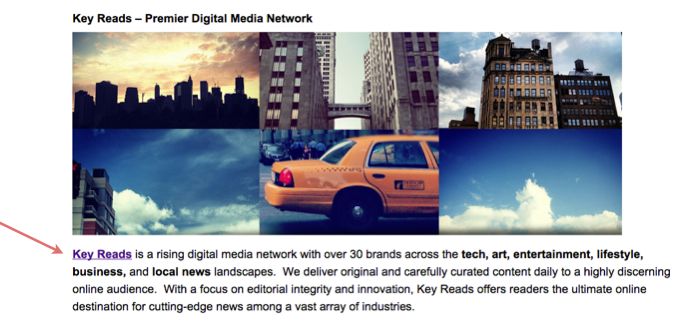
Hyperlink Tag – <a href=”http://URLGOESHERE.com/”>link text that is displayed
To make your link open in a new window add the target attribute <a href=”http://URLGOESHERE.com/” target=”_blank”>link text that is displayed
Headings
Headings help your page to be properly indexed and easily readable by search engines. Heading elements are available in six levels
HEADING TEXT
HEADING TEXT
HEADING TEXT
HEADING TEXT
HEADING TEXT
HEADING TEXT
Headings can be styled with CSS to customize the look of each level, but the standard format is from big to small.
Lists
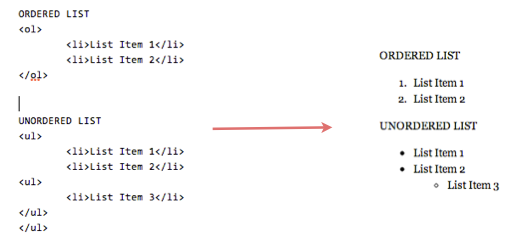
Ordered List
- then
Unordered List
- then
To add another list/indent within a list, just insert another list tag.
Related Posts